Claude AI, developed by Anthropic, offers a powerful set of features designed to assist with writing, coding, and task management. Its natural language processing capabilities allow it to create human-like text and answer complex questions effectively. Claude can handle multistep tasks and maintain coherence over lengthy documents while remembering user preferences for personalized interactions. The integration with various tools enhances its functionality further. Users can leverage markdown files for context management or use slash commands for efficiency. Although Claude AI is user-friendly and adaptable, some may need to be cautious about potential inaccuracies in its outputs or the limits of the free version’s usage caps.
Table of Contents
- Core Features of Claude AI
- Building Blocks of Claude AI
- Practical Use Cases for Claude AI
- Advantages and Limitations of Claude AI
- Comparing Claude AI with Other AI Models
- Frequently Asked Questions
1. Core Features of Claude AI
 Credits: threads.com
Claude AI excels in natural language understanding, processing input text to grasp the context, tone, and intent behind user queries. This capability allows for more natural interactions, making conversations feel fluid and engaging. Its human-like text generation enables it to produce responses that mimic human dialogue, which is particularly beneficial for applications like customer support, where clarity and relatability are key. Claude also tackles complex queries effectively, providing thorough answers that reflect its extensive knowledge base.
One of its standout features is contextual awareness, where Claude retains the context throughout a conversation. This ensures that its responses remain relevant and coherent, even in lengthy discussions. Users appreciate the ability to customize outputs, adjusting styles and tones to suit specific needs or preferences, making interactions more personalized.
Claude learns from feedback, improving over time by adapting to user corrections. This continuous learning enhances the quality of interactions, allowing users to feel more understood. Additionally, Claude’s multi-language support broadens its usability, enabling communication with international users seamlessly.
For educational purposes, Claude includes interactive learning tools, such as quizzes and coding challenges, making it a versatile resource. It can also assist in content refinement, allowing users to enhance existing content for clarity and engagement. In collaborative environments, Claude’s real-time collaboration feature enables it to assist multiple users simultaneously, making it an asset for team projects and brainstorming sessions.
2. Building Blocks of Claude AI
 Credits: dextralabs.com
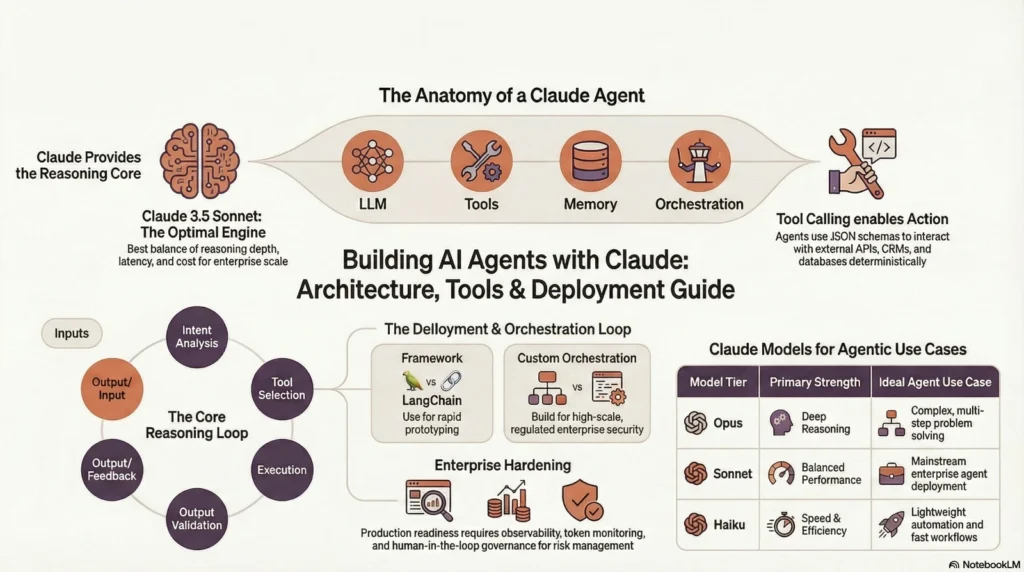
Claude AI is equipped with several building blocks that enhance its functionality and user experience. One of the fundamental elements is the User Profiles feature, allowing users to create profiles that help Claude tailor its responses based on individual preferences and interaction history. This personalization makes conversations more relevant and engaging.
The Task Management System acts as a virtual assistant, enabling Claude to organize tasks and set reminders. This feature is particularly useful for managing daily activities and ensuring that important tasks are not overlooked.
Another key component is the Scripted Workflows, which allow users to define specific sequences of commands that Claude can follow to automate repetitive tasks. This capability streamlines processes, saving users time and effort.
Claude also supports API Integration, allowing it to connect with external applications for seamless data exchange and enhanced workflow functionality. This integration capability means Claude can fit into various work environments without disrupting established systems.
In terms of flexibility, the Data Import/Export feature supports various formats, making it easier for users to work with diverse file types. This is especially advantageous for those who frequently handle different kinds of data.
Users can benefit from Interactive Tutorials, which provide guides on effectively using Claude’s features. These tutorials enhance user experience by helping users quickly understand how to leverage the AI’s full potential.
To facilitate continuous improvement, Claude includes a Feedback Mechanism that allows users to provide input on its performance. This system is vital for refining Claude’s capabilities over time.
For added versatility, users can create Custom Command Creation, enabling them to define specific commands for particular tasks. This feature increases the adaptability of Claude, catering to unique user needs.
Moreover, Claude features Version Control, allowing users to save different versions of their interactions. This means users can easily revert to earlier states if needed, providing a safety net during complex tasks.
Finally, the platform offers Community Resources, giving users access to user-generated content and templates that can be shared within the Claude user community. This collaborative aspect fosters a sense of community and shared learning among users.
- User Profiles: Users can create profiles that help Claude tailor its responses based on individual preferences and history.
- Task Management System: Claude can organize tasks and set reminders, acting as a virtual assistant to help manage daily activities.
- Scripted Workflows: Users can define specific sequences of commands that Claude can follow to automate repetitive tasks.
- API Integration: Claude can connect with external applications, allowing for data exchange and enhanced functionality within existing workflows.
- Data Import/Export: It supports importing and exporting data in various formats, making it easier to work with diverse file types.
- Interactive Tutorials: Users can access guides and tutorials that demonstrate how to use Claude’s features effectively, enhancing user experience.
- Feedback Mechanism: A system for users to provide feedback on Claude’s performance, fostering continuous improvement.
- Custom Command Creation: Users can create their own commands for specific tasks, increasing the versatility of the AI.
- Version Control: Claude allows users to save different versions of their interactions, making it easy to revert to earlier states if needed.
- Community Resources: Access to user-generated content and templates that can be shared within the Claude user community.
3. Practical Use Cases for Claude AI

Claude AI offers a wide range of practical use cases that cater to various needs. For instance, in email drafting, Claude can help users create professional emails that strike the right tone and clarity. This is especially valuable for busy professionals who want to ensure their messages are effective without spending too much time on wording.
In the realm of content creation, Claude aids in producing articles, blogs, and other written materials, optimizing them for engagement and search engine optimization (SEO). This feature allows writers to focus on their ideas while Claude handles the structural and linguistic details.
Claude also excels in coding assistance, where it can analyze code for potential issues and offer suggestions for improvement or refactoring. This capability is beneficial for both beginner programmers who need guidance and experienced developers looking for a second opinion.
For those needing to communicate across language barriers, Claude’s language translation feature is a valuable tool. It translates text between languages, making it easier for users to connect with a global audience.
Additionally, Claude serves as a research assistant, helping users gather information on various topics. It can summarize key points and insights, streamlining the research process and saving time.
In educational contexts, Claude provides personalized learning by tailoring content based on user interests and skill levels, making it a great resource for students and lifelong learners.
Social media management is another area where Claude shines, as it can craft engaging posts, respond to comments, and analyze engagement metrics, helping users refine their outreach strategies.
For those in creative fields, Claude can support creative writing by suggesting plot ideas, character development, and dialogue for storytelling projects, enhancing the creative process.
Moreover, Claude can assist with data analysis by interpreting datasets, providing insights, and even creating visualizations to help users understand complex information.
Lastly, after meetings, Claude can summarize discussions and outline action items for follow-up, ensuring that important points are not overlooked.
4. Advantages and Limitations of Claude AI
Claude AI offers several advantages that make it appealing to users. Its user-friendly interface allows individuals with varying tech skills to navigate its features easily. Additionally, Claude’s ability to learn and adapt to user preferences enhances the relevance of its interactions over time, making it a more personalized experience. The robust security measures in place prioritize user privacy and data protection, which is crucial in today’s digital landscape. Claude’s versatility allows it to be applied across different fields, such as education, business, and creative industries, catering to a wide range of needs. Furthermore, its cross-platform compatibility means that users can access Claude on desktops, tablets, and smartphones, ensuring convenience and flexibility. With various pricing tiers available, Claude also provides cost-effective solutions that fit different budgets.
However, there are limitations to consider. One notable drawback is Claude’s limited context retention during long conversations. In lengthy interactions, it may lose track of earlier details, which can affect the coherence of responses. Additionally, Claude’s full capabilities depend on a stable internet connection, which may restrict its use in offline situations. Like any AI, there is also a potential for misinterpretation of user intent, leading to responses that may not fully address user needs. Lastly, regular updates and maintenance are necessary for Claude to remain current, which can result in temporary service interruptions.
5. Comparing Claude AI with Other AI Models
Claude AI stands out in several areas when compared to other AI models like ChatGPT. For instance, it excels in managing long-form content, providing thorough analysis, which is particularly useful for tasks requiring detailed exploration of topics. ChatGPT may outpace Claude in terms of response speed for quick queries, making it a better choice for users who need rapid answers. Claude also places a strong emphasis on ethical AI use, aiming to produce fewer harmful outputs than some competitors. This ethical focus is a significant differentiator, especially for those concerned about responsible AI utilization.
Customization options are another area where Claude shines, allowing users to tailor interactions more extensively than many other models. This adaptability can enhance user satisfaction as it aligns the AI’s responses with individual preferences. Additionally, Claude supports a wider range of integrations with external tools, making it versatile for users who want to automate workflows or connect with various applications.
In terms of learning mechanisms, Claude employs an adaptive learning process that improves interactions over time, contrasting with models that have more static learning approaches. Furthermore, the growing community around Claude provides users with templates and resources, enhancing the overall experience beyond what many competitors offer. Finally, Claude’s pricing structure is competitive, offering options that may better suit different user needs compared to other AI tools.
| Feature | Claude AI | Competitors |
|---|---|---|
| Performance in Long-Form Content | Excels in managing lengthy texts and detailed analysis | May not provide the same depth in lengthy content |
| Ethical Considerations | Emphasizes ethical AI use to reduce harmful outputs | Varies between models |
| Customization Options | Offers extensive customization for user interactions | Less customizable compared to Claude |
| Response Speed | Thorough, but may be slower than some alternatives | Quicker responses for rapid queries |
| User Engagement | Conversational style fosters deeper engagement | More transactional approach in many models |
| Integration Capabilities | Wider range of integrations with external tools | Limited integrations in some alternatives |
| Learning Mechanisms | Adaptive learning process to improve interactions over time | Some models may have static learning |
| Community Support | Growing community shares templates and resources | Varies widely based on model |
| Pricing Structure | Competitive pricing models suitable for different needs | Offers varying pricing depending on features |
| Market Position | Unique features and ethical focus appeal to responsible AI users | Position varies based on feature set and pricing |
Frequently Asked Questions
What can Claude AI do for me?
Claude AI can help you with understanding information, generating text, and answering questions in a way that feels natural and easy to follow.
How does Claude AI understand my requests?
Claude AI uses advanced algorithms to analyze your words and context, allowing it to grasp what you mean and respond accurately.
Can I customize how Claude AI works?
Yes, you can adjust settings and preferences to make Claude AI serve you better, based on your specific needs.
Is Claude AI good at understanding different topics?
Claude AI is trained on a wide range of subjects, so it can provide insights on many topics, but it may not know everything.
How does Claude AI learn and improve over time?
Claude AI improves by processing more data and feedback, which helps it get better at understanding and responding in the future.
TL;DR Claude AI, developed by Anthropic, is a versatile conversational AI that excels in natural language processing, multistep task handling, and large context management. Key features include memory and context management, seamless integration with external tools, and the ability to create workflows using markdown files, slash commands, and plugins. Practical use cases range from writing and coding assistance to document analysis and visual understanding. While Claude AI stands out for its deep reasoning and ethical design, limitations include potential inaccuracies and usage caps for free users. Compared to other models like ChatGPT, Claude AI is better suited for in-depth analysis and long documents.
Comments are closed