Gemini Pro is a generative AI tool from Google, designed to boost productivity in Google Workspace applications. It helps users brainstorm and analyze data, making tasks like writing and summarizing easier. With its multimodal abilities, Gemini can create content in various forms such as text, images, and even audio. Effective use demands good prompt design, so users can engage naturally with the tool without complex programming knowledge. Also noteworthy is its customization through model tuning for tailored outputs. Available guides and community resources make learning straightforward for anyone wanting to harness this innovative technology for diverse applications.
Table of Contents
- Overview of Gemini Pro
- What is Gemini Pro?
- AI Assistance in Google Workspace
- Multimodal Capabilities of Gemini
- Understanding Prompt Design
- Customization and Model Tuning Options
- Practical Applications of Gemini Pro
- Enhanced Learning with Gemini
- Creative Production Using Gemini
- Automation of Workflows with AI
- Code Generation for Developers
- Learning Resources for Gemini Pro
- Official Guides and Tutorials
- Community and Support for Users
- Frequently Asked Questions
Overview of Gemini Pro

Gemini Pro is a generative AI tool from Google that aims to enhance productivity within Google Workspace applications. It provides users with AI-driven suggestions that help streamline tasks such as content creation, data analysis, and workflow automation. Integrated into popular apps like Google Docs, Sheets, and Slides, Gemini Pro makes it easier for users to focus on their creative processes while the AI handles repetitive or complex tasks. This versatility makes it suitable for various industries, including education, marketing, and software development. Its ability to generate content in multiple formats, from text to images and even video, allows users to adapt it for different needs. As part of Google’s mission to incorporate AI into everyday tools, Gemini Pro is continuously updated, ensuring that users have access to the latest functionalities and improvements.
What is Gemini Pro?
Gemini Pro is an advanced AI tool created by Google that works within Google Workspace to help users be more productive. This tool uses generative AI technology to assist with tasks like content creation and automation, making it easier for individuals and teams to manage their work. With its ability to understand natural language, users can communicate with Gemini Pro in a straightforward way, avoiding complex commands or technical jargon. It integrates with popular applications such as Google Docs, Sheets, and Gmail, streamlining everyday tasks. Users don’t need to have deep technical knowledge to utilize its features, as it is designed to be user-friendly with a simple interface. Gemini Pro aims to improve workflows by automating repetitive tasks and offering real-time suggestions. Over time, it learns from user interactions, making its recommendations increasingly relevant. This makes it a valuable tool for enhancing collaboration and productivity in both individual and team settings.
AI Assistance in Google Workspace
 Credits: amyntas.in
Gemini Pro integrates smoothly with Google Workspace applications like Docs, Sheets, and Slides, making it easier for users to leverage AI. In Google Docs, you can draft content and generate summaries right where you work, eliminating the need to switch between tools. When using Google Sheets, Gemini Pro analyzes your data and provides automatic insights and visualizations, simplifying data handling. In Google Slides, the AI helps you create presentations rapidly by generating relevant content based on your prompts. Gmail users can enjoy AI-generated responses and organization tips, streamlining email management. Furthermore, Gemini Pro supports task and calendar management, helping optimize your workflow. Collaboration is enhanced too, as users can share suggestions and insights in real time. You can even adjust the level of assistance you receive, allowing Gemini to adapt to your preferences and improve its suggestions based on your behavior over time. This seamless integration creates a more cohesive and efficient working environment.
Multimodal Capabilities of Gemini
 Credits: arxiv.org
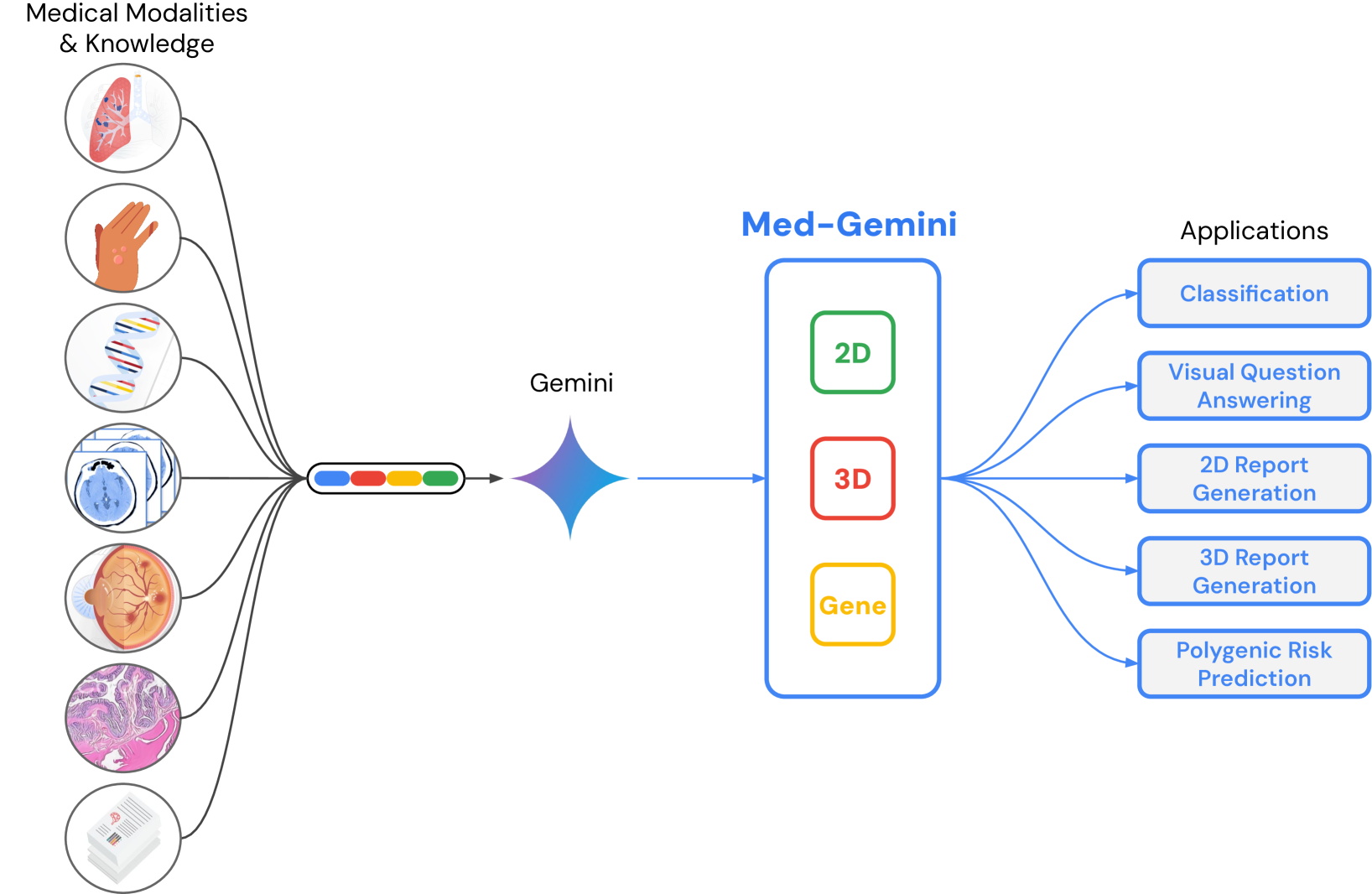
Gemini Pro stands out with its ability to generate and process diverse content types, including text, images, and audio. This versatility enables users to effortlessly create infographics, videos, and presentations tailored to their needs. For instance, when provided with a visual prompt, Gemini can automatically generate corresponding content, making it easy to visualize ideas. Users can also request specific formats, such as converting text into a video script or designing an infographic, which streamlines the creative process. The multimodal nature of Gemini Pro is particularly beneficial for various applications, ranging from marketing materials to educational resources. It supports creative projects by allowing users to mix different media types, resulting in richer presentations. Additionally, Gemini can analyze multimedia content, offering suggestions for enhancements, which helps improve the overall quality of the output. Developers can benefit too, as Gemini can generate code snippets based on natural language descriptions, simplifying programming tasks. By handling multiple content types, Gemini Pro reduces the need for additional tools and software, making it an all-in-one solution for a broad audience with varied creative and professional needs.
Understanding Prompt Design
Effective interaction with Gemini Pro starts with crafting clear and specific prompts. The AI excels in interpreting natural language, making it easy for users to communicate their needs. To see how the AI responds, users can experiment with different prompt styles, which can lead to better results. Providing context in prompts is crucial, as it helps the AI generate more accurate and relevant outputs. Being specific about the desired format and content type also enhances the quality of the responses. Gemini Pro can generate replies based on conversational prompts, creating a more engaging experience for users. Follow-up questions can refine the AI’s outputs further, enhancing the dialogue. Learning from examples of good prompts can guide users in effective communication with the AI. Understanding prompt design is essential for maximizing the potential of Gemini Pro across various tasks. Users are encouraged to iterate on their prompts to achieve the best results.
Customization and Model Tuning Options
Gemini Pro provides users with a range of customization options to meet their specific needs. This includes adjusting the AI’s behavior and the way it generates content. Businesses can fine-tune the model to ensure that the outputs are relevant and accurate, aligning with their goals. For example, a marketing team may want the AI to adopt a more persuasive tone when creating promotional materials, while a technical team may prefer a straightforward, factual style. Users can also train the AI on specific industry terminology, which enhances its effectiveness in niche areas.
Additionally, Gemini Pro allows for adjustments based on previous interactions. By incorporating user feedback, the AI continuously improves its performance and response times. This iterative learning process helps create a more personalized and satisfying experience. To help users make the most of these features, there are tutorials available that guide them through the customization process. Overall, these tuning options make Gemini Pro versatile and suitable for various professional applications.
Practical Applications of Gemini Pro
 Credits: medium.com
Gemini Pro offers a variety of practical applications that can enhance productivity and creativity across different fields. For students and educators, it can generate personalized study materials, making learning more engaging and tailored to individual needs. Users can create interactive presentations and educational content that captures the attention of specific audiences, helping to convey complex topics with ease. In brainstorming sessions, Gemini Pro provides creative input and suggestions, serving as a valuable tool for teams looking to innovate.
Moreover, Gemini can automate routine tasks, such as scheduling and data entry, freeing up time for users to focus on more strategic activities. Marketing teams benefit from Gemini’s ability to generate compelling content for campaigns and social media, ensuring that messaging resonates with target audiences. For project management, it assists in creating timelines and action items, streamlining processes and helping teams stay organized.
Creative professionals can rely on Gemini to generate unique content ideas and concepts, whether for writing, art, or design. Its content curation capabilities allow users to summarize articles and reports, making information easier to digest. Additionally, Gemini can help in the design process by assisting in the creation of prototypes and mockups, which can save time and improve the overall workflow. Developers also find value in Gemini Pro, as it can support coding tasks by generating functional code snippets based on user descriptions, making it easier to tackle complex programming challenges.
Enhanced Learning with Gemini
Gemini Pro is designed to enhance the learning experience by tailoring educational content to meet individual needs. For instance, it can generate quizzes and flashcards based on the topics a user is studying, making review sessions more effective. The AI’s ability to provide real-time feedback on presentations helps users refine their delivery and content, ensuring they grasp the material better. Additionally, Gemini Pro suggests extra resources and readings aligned with user interests, which can deepen understanding. Teachers benefit from its features as well, using it to create lesson plans and instructional materials quickly. When it comes to research, Gemini Pro excels by summarizing complex topics and offering key insights, making it easier for users to digest information. Users can also engage in tutoring sessions across various subjects, promoting interactive learning through engaging content formats. The AI tracks progress and highlights areas needing improvement, fostering a culture of continuous learning. Overall, Gemini Pro makes the educational process dynamic and user-focused.
Creative Production Using Gemini
 Credits: blog.adobe.com
Gemini Pro is designed to enhance creative production across various domains. It helps users generate diverse types of content, including written material and visual designs. For example, marketers can easily create brochures, ads, and social media posts that grab attention. Additionally, writers can use Gemini to develop unique stories or scripts based on simple prompts, allowing for endless creativity with minimal effort.
The tool also plays a significant role in web design by generating layout suggestions and content ideas, making the design process smoother. Educators can benefit from Gemini by creating interactive experiences and educational games that engage students in new ways. Artists can explore different artistic styles by asking the AI to generate images or designs, giving them new inspiration for their projects.
During brainstorming sessions, Gemini can help by providing creative prompts and ideas, making collaboration more efficient. It can even analyze existing works, suggesting enhancements or variations to improve the final product. This versatility positions Gemini Pro as a valuable asset not only for artists but also for marketers looking to streamline their creative processes.
Automation of Workflows with AI
Gemini Pro can significantly enhance productivity by automating routine tasks such as data entry and report generation, which saves users valuable time. For instance, instead of manually entering data into spreadsheets, users can set up Gemini Pro to handle these tasks automatically, allowing them to focus on more critical aspects of their work. Additionally, the AI can streamline communication by organizing emails and suggesting responses, making it easier for users to manage their inboxes efficiently.
Users can create workflows that trigger actions based on specific criteria. For example, if a project deadline is approaching, Gemini Pro can automatically remind team members, ensuring that everyone stays on track. This feature not only enhances efficiency but also maintains control over critical tasks, allowing users to oversee important processes while benefiting from automation.
Moreover, Gemini Pro can integrate with other applications, enabling the automation of multi-step processes. This means that tasks spanning various platforms can be streamlined. For example, a marketing campaign could be automated to send emails, update social media, and track responses all in one go. Users can also rely on the tool for project management by generating checklists and reminders based on their input, which helps keep projects organized.
The AI is also capable of automating scheduling and calendar management, which reduces the administrative burden on individuals and teams. By minimizing human error in repetitive tasks, automation can lead to improved accuracy in work outputs. Additionally, Gemini Pro supports the automation of marketing campaigns, ensuring that outreach is timely and relevant to the target audience. Overall, its workflow automation capabilities make Gemini Pro a powerful tool for businesses seeking to enhance efficiency.
Code Generation for Developers
Gemini Pro is a valuable tool for developers looking to simplify their coding tasks. It can create code snippets in various programming languages, which makes it easier to get started on projects. Developers only need to describe the functionality they need in plain language, and Gemini Pro will translate that description into actual code. This process not only speeds up development but also often results in well-structured code, which can significantly reduce debugging time.
Another advantage of Gemini Pro is its support for multiple coding frameworks, enabling developers to work on diverse applications without switching tools. The generated code can be easily customized to fit specific project requirements, allowing for flexibility in development. Additionally, code suggestions from Gemini Pro can be integrated into existing projects, helping to enhance features without the need to start from scratch.
Gemini Pro also includes error-checking capabilities, which help improve code quality before deployment. Developers can request comments and documentation alongside the generated code, making it easier to understand and maintain. Furthermore, the tool can generate test cases based on the code it produces, which is beneficial for software quality assurance. Regular updates to Gemini Pro ensure that developers have access to the latest coding capabilities, keeping them at the forefront of technology.
Learning Resources for Gemini Pro
 Credits: blog.google
Google provides extensive documentation that covers all features of Gemini Pro in detail, making it a great starting point for new users. Video tutorials available on platforms like YouTube demonstrate practical applications of the tool, helping users visualize how to implement its features effectively. Online forums and communities allow users to share tips, ask questions, and learn from each other’s experiences, fostering a collaborative learning environment. Additionally, Google hosts webinars and live sessions where users can interact with experts, gaining insights directly from those knowledgeable about the tool. For hands-on learning, practice exercises and projects are available to help users apply what they learn from the tutorials. Regular blog posts from Google highlight new features and provide guidance on maximizing the potential of Gemini Pro. Users can also access FAQs and troubleshooting guides to resolve common issues quickly. For those seeking structured learning paths, courses on platforms like Coursera or Udemy may offer comprehensive courses on Gemini Pro. User-generated content, including articles and blogs, provides alternative viewpoints and tips that can help users make the most of their experience. Lastly, community challenges and contests encourage users to explore Gemini Pro creatively, pushing the boundaries of what can be achieved with this innovative tool.
- Google provides extensive documentation that covers all features of Gemini Pro in detail.
- Users can find video tutorials on platforms like YouTube, which demonstrate practical applications of the tool.
- Online forums and communities allow users to share tips and ask questions about using Gemini Pro effectively.
- Webinars and live sessions hosted by Google offer opportunities for users to learn directly from experts.
- Practice exercises and projects are available to help users apply what they learn from the tutorials.
- Regular blog posts from Google highlight new features and how to make the most of Gemini Pro.
- Users can access FAQs and troubleshooting guides to resolve common issues quickly.
- Courses on platforms like Coursera or Udemy may offer structured learning paths for Gemini Pro.
- User-generated content, such as articles and blogs, provides alternative insights and tips for effective use.
- Community challenges and contests may encourage users to explore Gemini Pro in innovative ways.
Official Guides and Tutorials
The official Google Workspace Learning Center offers a wealth of resources for users interested in mastering Gemini Pro. Beginners can access step-by-step guides that simplify the learning process, helping them navigate the tool’s features with ease. For those looking to integrate Gemini Pro with other Google applications, specific tutorials provide clear instructions on making the most of these connections. Users can also benefit from interactive demos that showcase Gemini Pro’s capabilities in real-time scenarios, allowing for a hands-on experience.
For learners who prefer offline study, printable resources are available, offering a tangible way to absorb information. The guides are regularly updated to reflect the latest features and best practices, ensuring that users stay informed about any changes. Subscribing to newsletters from Google can keep users in the loop regarding new tutorials and resources as they become available.
Additionally, case studies illustrate practical applications of Gemini Pro across various industries, demonstrating its versatility. Advanced users can explore guidebooks designed to deepen their skills, while short video snippets help users quickly grasp specific features or functionalities. Feedback sections in guides allow users to share their experiences, fostering a community of continuous improvement.
Community and Support for Users
Online communities play a vital role for users of Gemini Pro. Platforms like Reddit and Stack Overflow are popular for discussing features and troubleshooting issues, allowing users to share tips and solutions. Additionally, Google’s official support page is a go-to resource for direct assistance with any technical problems that may arise while using the tool. Social media also fosters connections among users, with dedicated groups where individuals can exchange experiences and insights.
Organized meetups and user groups encourage collaboration and networking, offering opportunities for users to learn from each other. Channels for user feedback enable suggestions for updates and new features, ensuring the tool continues to evolve based on community needs. Collaborative projects can be launched through these platforms, enhancing shared learning experiences.
Webinars that showcase user stories provide inspiration for new ideas and applications of Gemini Pro, while community-driven challenges motivate users to experiment with the tool in creative ways. Recognition programs can highlight outstanding contributions, fostering a sense of belonging among community members. Furthermore, support resources such as chatbots or live help options offer immediate assistance, ensuring users have help when they need it.
Frequently Asked Questions
What is Gemini Pro and how can it help me?
Gemini Pro is a generative AI tool that helps you create content easily. It can assist with writing, image generation, and more, making your tasks simpler.
Do I need any special skills to use Gemini Pro?
No, you don’t need special skills to use Gemini Pro. It is designed to be user-friendly, so anyone can learn how to use it.
Can I use Gemini Pro for different types of projects?
Yes, you can use Gemini Pro for various projects like blogs, social media posts, and creative writing. It is versatile and adaptable.
Is there a way to customize the output from Gemini Pro?
Yes, you can customize the output by adjusting prompts or settings. This allows you to tailor the content to your specific needs.
How do I get started with Gemini Pro?
To get started, simply sign up for an account, explore the interface, and follow the tutorials provided. They will guide you through the basics.
TL;DR Gemini Pro is a generative AI tool by Google designed to enhance productivity within Google Workspace applications. It supports various functionalities, including AI assistance for tasks, multimodal content generation, and prompt design for user-friendly interactions. The tool offers customization and model tuning for tailored solutions, and is applicable in fields like learning, creative production, workflow automation, and code generation. Users can access helpful guides and community forums to maximize the use of Gemini Pro.
Comments are closed